

لقطات الشاشة
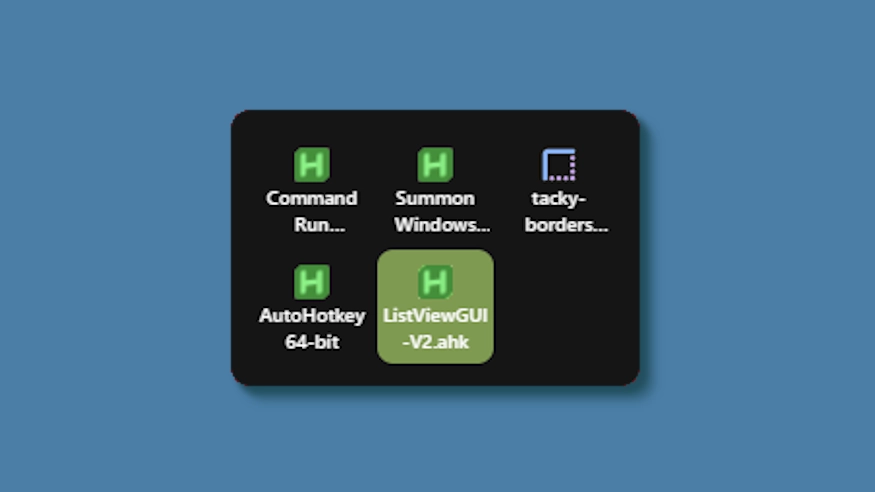
الوصف
This theme changes the system tray menu to be grid-based like windows, the labels always shown.
Updates:
(8/6/26)
- Link add.
(7/16/26)
- Changed method a bit - no more alignment issues (~ with defaults).
- Letter thickness and case options added. Some options removed (hardcoded defaults).
- Settings lightly restructured and wording updated.
(3/3/26)
- Cells no longer stretch (width) to fill empty space. Cells are always the exact width and height set, so no more ugly spacing.
- The tray will now only be as big as needed — no empty space when there are fewer icons than the configured column limit.
- Various new options to be able to control the layout.
كيفية الاستخدام؟
- التنزيل والتثبيت Seelen UI
- تأكد من تشغيل التطبيق
- انقر على زر التنزيل أعلاه
- قبول مطالبة المتصفح بفتح واجهة مستخدم سيلين
- سيتعامل التطبيق مع التثبيت
- وهذا كل شيء!
التوافق
- Seelen UI: 2.8.2+
- المنصة: Windows
المزيد بواسطة k-ivy


الموارد ذات الصلة









معلومات عن الموارد
- ID: 5ed0eb93-85c7-46ac-ba8c-5b4e65086c55
- النوع: الموضوع
- الحالة: منشورة
- تم إنشاؤها في: الثلاثاء، 6 مايو 2025 في 3:08:12 ص UTC
- آخر تحديث في: الأحد، 16 أغسطس 2026 في 3:35:18 م UTC
- تمت المراجعة في: الأحد، 16 أغسطس 2026 في 3:35:18 م UTC
- تمت المراجعة من قبل:@eythaann