

Snímky obrazovky
Popis
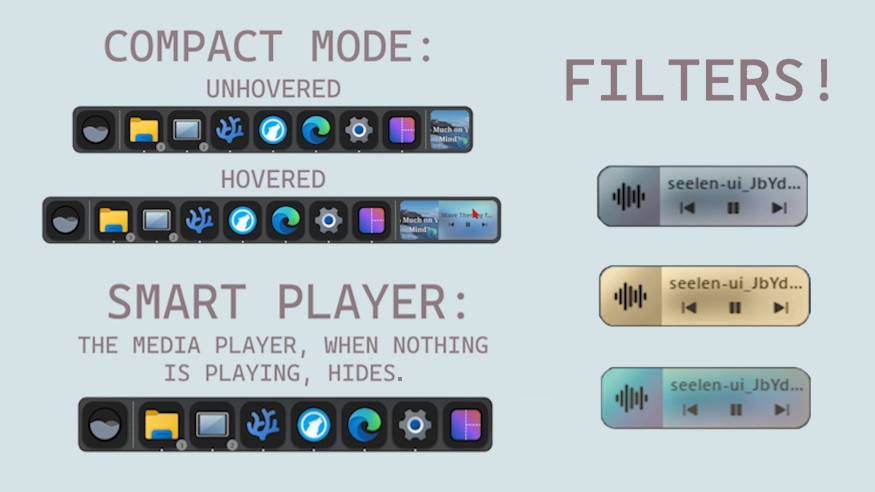
This theme allows you to change the behavior of the dock's media player and add filters to it to adjust it's appearance.
Possible Behavior Changes:
-
Compact Mode (default): Unless hovered, the Media Player stays at your set item size.
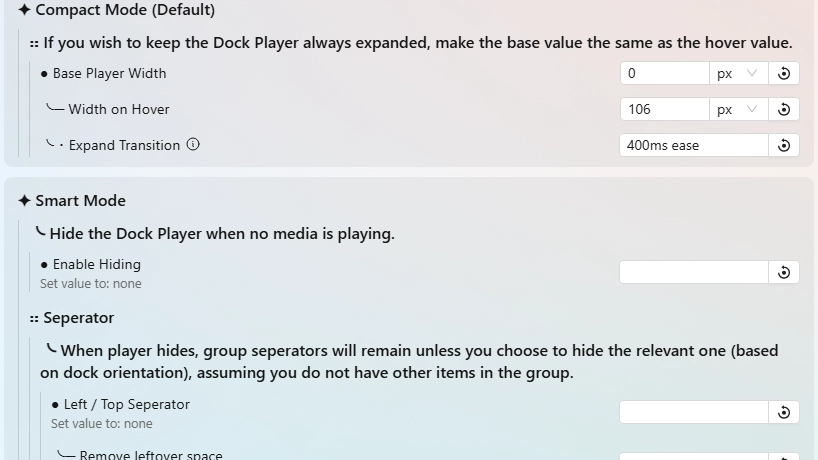
- If you want the regular Always Expanded Mode, it's simple. You just have to match the base width and hover width values in the theme's settings.
-
Smart Mode (not default): When no media is playing, the player hides. Alongside that, you can configure it to hide the leftover seperator and empty space to match.
UPDATES: (11/21/25) >
- Code cleanup & removed all toolbar media module code. Full focus of this is dock player.
- Restructured settings & added hover-specific variants for filters, and option to remove leftover space when player and seperator hides.
- No set filters, for default player appearance.
UPDATES: (11/22/25) >
- Added options to adjust the base and hover size of the buttons for scale effect (default)
- Removed code to make thumnail fill container as it's been split into it's own for user choice: https://seelen.io/resources/k-ivy/media-thumb-fill
If you encounter some issue, you can report it to me in the following ways:
- In the #resources post on the Seelen-UI Discord.
- Create a issue post on my GitHub page: https://github.com/K-Ivy/Kays-SeelenUI-Themes
Enjoy!
Jak používat?
- Stažení a instalace Seelen UI
- Ujistěte se, že je aplikace spuštěna
- Klikněte na tlačítko ke stažení výše
- Přijměte výzvu prohlížeče k otevření uživatelského rozhraní Seelen
- Aplikace se postará o instalaci
- A to je vše!
Kompatibilita
- Seelen UI: 2.4.7+
- Platforma: Windows
Více od k-ivy
 Grid Style Tray - Hover for Label
 Grid Style Tray - Always Show Label
 Hide Media Source Icons
 Filled Window Previews
 Indiviual Coloring of Toolbar Modules
 Windows 11 Start Icon
 Windows Concept Start Icon
 Warp Start Icon
 Apple Start Icon
 NixOS Start Icon
 Dots Start Icon
 Animated Windows XP Start Icon
 Animated Vista Start Icon
 Animated Windows 10 Start Icon
 Animated Whiteout Win 7 Start Icon
 Filled Media Thumbnails
 Custom Username
 Media Module Player Customizer
 Slide - Wallpaper Switch Animation
 Zoom Fade - Wallpaper Switch Animation
 Blur - Wallpaper Switch Animation
 Fade - Wallpaper Switch Animation
Související zdroje








Informace o zdrojích
- ID: db35ab52-dbfa-493c-8771-08f0fc510737
- Přátelský identifikátor: @k-ivy/dock-comp-media
- Typ: Téma
- Stav: Zveřejněno na
- Vytvořeno v: pátek 2. května 2025 v 16:55:16 UTC
- Poslední aktualizace: neděle 23. listopadu 2025 v 3:31:49 UTC
- Recenzováno na: neděle 23. listopadu 2025 v 3:31:53 UTC
- Zhodnotil:@k-ivy