

Screenshots
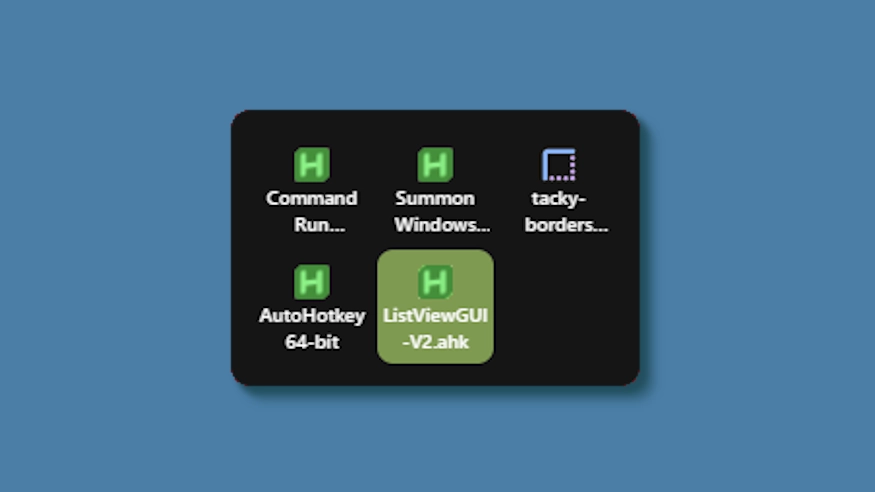
Beschreibung
This theme changes the system tray menu to be grid-based like windows, the labels always shown.
Updates:
(8/6/26)
- Link add.
(7/16/26)
- Changed method a bit - no more alignment issues (~ with defaults).
- Letter thickness and case options added. Some options removed (hardcoded defaults).
- Settings lightly restructured and wording updated.
(3/3/26)
- Cells no longer stretch (width) to fill empty space. Cells are always the exact width and height set, so no more ugly spacing.
- The tray will now only be as big as needed — no empty space when there are fewer icons than the configured column limit.
- Various new options to be able to control the layout.
Wie wird es verwendet?
- Herunterladen und installieren Seelen UI
- Stellen Sie sicher, dass die Anwendung ausgeführt wird
- Klicken Sie auf den Download-Button oben
- Akzeptieren Sie die Browseraufforderung zum Öffnen von Seelen UI
- Die App übernimmt die Installation
- Und das ist alles!
Kompatibilität
- Seelen UI: 2.8.2+
- Plattform: Windows
Mehr von k-ivy


Verwandte Ressourcen






Informationen zu den Ressourcen
- ID: 5ed0eb93-85c7-46ac-ba8c-5b4e65086c55
- Typ: Thema
- Status: Veröffentlicht
- Erstellt am: Dienstag, 6. Mai 2025 um 03:08:12 UTC
- Zuletzt aktualisiert am: Sonntag, 16. August 2026 um 15:35:18 UTC
- Rezensiert am: Sonntag, 16. August 2026 um 15:35:18 UTC
- Rezensiert von:@eythaann