

Capturas de pantalla
Descripción
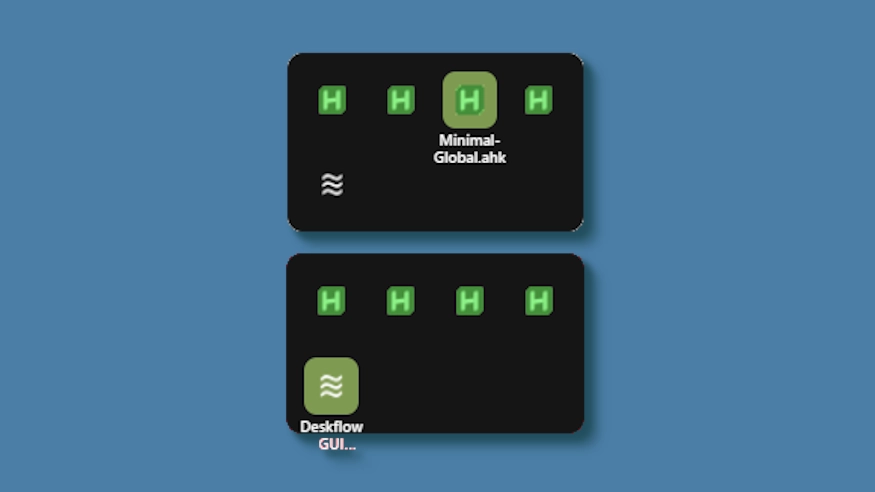
This theme changes the system tray menu to be grid-based like windows, the labels revealed on hover.
Demo: https://github.com/user-attachments/assets/ecac5a81-957d-419d-a447-3029ea0af218
Updates:
(8/6/26)
- Link add.
(3/3/26)
- Cells no longer stretch (width) to fill empty space. Cells are always the exact width and height set, so no more ugly spacing.
- The tray will now only be as big as needed — no empty space when there are fewer icons than the configured column limit.
- Labels properly appear outside the bounds of the tray.
- Various new options to be able to control the layout.
¿Cómo se utiliza?
- Descargar e instalar Seelen UI
- Asegúrese de que la aplicación se está ejecutando
- Haga clic en el botón de descarga
- Acepta la solicitud del navegador para abrir Seelen UI
- La aplicación se encargará de la instalación
- ¡Y eso es todo!
Compatibilidad
- Seelen UI: 2.8.2+
- Plataforma: Windows
Más de k-ivy


Recursos relacionados









Información sobre recursos
- ID: bc3dfebc-f534-4e0e-b08d-ef3744694138
- Tipo: Tema
- Estado: Publicado en
- Creado en: martes, 6 de mayo de 2025, 2:48:26 UTC
- Última actualización: viernes, 14 de agosto de 2026, 19:48:25 UTC
- Revisado en: viernes, 14 de agosto de 2026, 19:48:25 UTC
- Revisado por:@eythaann