

عکس
شرح
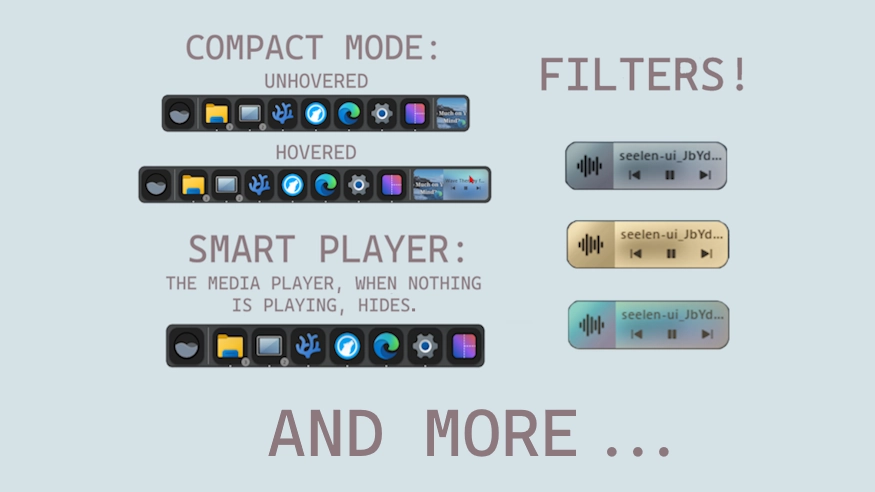
This theme allows you to customize the dock player and it's behaviors.
Updates:
(8/6/26)
- Tooltip correction & settings improvement (sliders for hue filter).
- Link adjustment.
(8/2/26)
- Update for 2.8.1+ and fixed some previous issues.
- Full settings restructure (focused on ease of use).
- Various settings/customization removals - either because noise, creates issues with something else, or is not friendly. However some may come back at a later date when I spend more time on it.
(3/18/26)
- Added back thumbnail fill (as an option - enabled by default)
- You can now fully change the look the the player. You can set custom colors or images - which are dynamic (based on the actual media cover/thumbnail).
- New behaviors:
- Width by Title > Makes it so the player width is based on media title length, not a fixed value.
- Title Scroll (Marquee) > Makes text scroll across - Demo: https://github.com/user-attachments/assets/bf9f4f08-1533-40ac-a3da-f931dcf3eccb
- Consider it experimental.
- Settings restructure and better wording and explantions.
چگونه استفاده کنیم؟
- دانلود و نصب کنید Seelen UI
- مطمئن شوید که برنامه در حال اجرا است
- روی دکمه دانلود در بالا کلیک کنید
- برای باز کردن رابط کاربری Seelen، درخواست مرورگر را بپذیرید
- برنامه نصب را انجام خواهد داد
- و بس!
سازگاری
- Seelen UI: 2.8.2+
- پلتفرم: Windows
بیشتر توسط k-ivy


منابع مرتبط









اطلاعات منبع
- ID: db35ab52-dbfa-493c-8771-08f0fc510737
- نوع: موضوع
- وضعیت: منتشر شده
- در: ۱۴۰۴ اردیبهشت ۱۲, جمعه ساعت ۱۶:۵۵:۱۶ (UTC)
- آخرین به روز شده در: ۱۴۰۵ مرداد ۲۵, یکشنبه ساعت ۱۵:۳۵:۵۵ (UTC)
- بررسی شده در: ۱۴۰۵ مرداد ۲۵, یکشنبه ساعت ۱۵:۳۵:۵۵ (UTC)
- بررسی شده توسط:@eythaann