

સ્ક્રીનશોટ
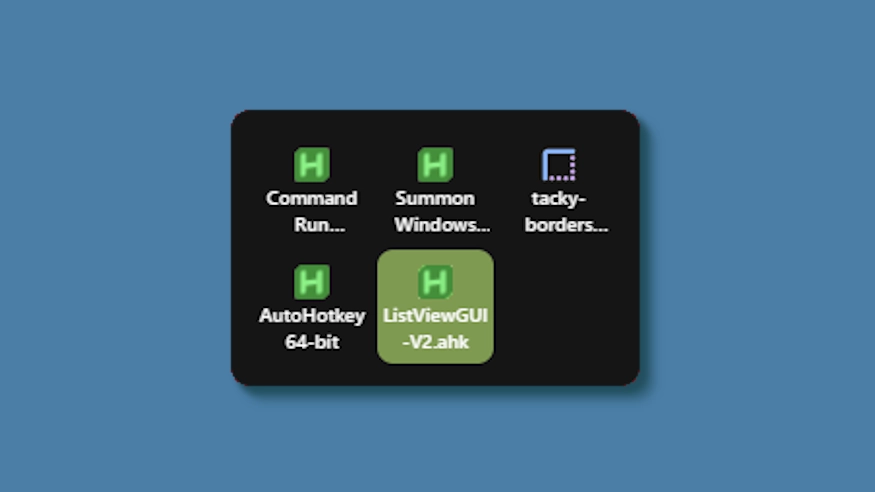
વર્ણન
This theme changes the system tray menu to be grid-based like windows, the labels always shown.
Updates:
(8/6/26)
- Link add.
(7/16/26)
- Changed method a bit - no more alignment issues (~ with defaults).
- Letter thickness and case options added. Some options removed (hardcoded defaults).
- Settings lightly restructured and wording updated.
(3/3/26)
- Cells no longer stretch (width) to fill empty space. Cells are always the exact width and height set, so no more ugly spacing.
- The tray will now only be as big as needed — no empty space when there are fewer icons than the configured column limit.
- Various new options to be able to control the layout.
કેવી રીતે ઉપયોગ કરવો?
- ડાઉનલોડ કરો અને ઇન્સ્ટોલ કરો Seelen UI
- ખાતરી કરો કે એપ્લિકેશન ચાલી રહી છે
- ઉપરના ડાઉનલોડ બટન પર ક્લિક કરો
- Seelen UI ખોલવા માટે બ્રાઉઝર પ્રોમ્પ્ટ સ્વીકારો
- એપ્લિકેશન ઇન્સ્ટોલેશનને હેન્ડલ કરશે
- અને તે બધુ જ છે!
સુસંગતતા
- Seelen UI: 2.8.2+
- પ્લેટફોર્મ: Windows
વધુ k-ivy દ્વારા


સંબંધિત સાધનસંપત્તિ






સંસાધન માહિતી
- ID: 5ed0eb93-85c7-46ac-ba8c-5b4e65086c55
- પ્રકાર: વિષય
- દરજ્જો: પ્રકાશિત
- આક્રમક: મંગળવાર, 6 મે, 2025 03:08:12 AM UTC
- છેલ્લે અપડેટ: રવિવાર, 16 ઑગસ્ટ, 2026 03:35:18 PM UTC
- સમીક્ષાની: રવિવાર, 16 ઑગસ્ટ, 2026 03:35:18 PM UTC
- દ્વારા સમીક્ષા થયેલ:@eythaann