

Screenshot
Descrizione
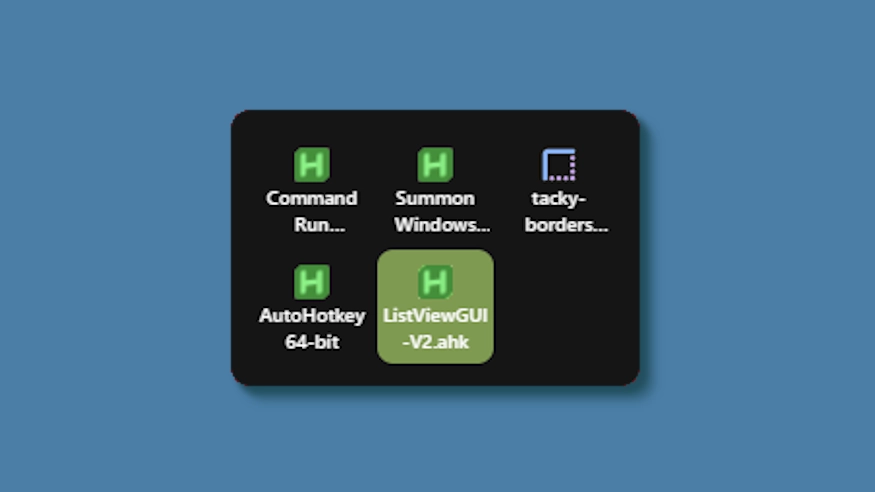
This theme changes the system tray menu to be grid-based like windows, the labels always shown.
Updates:
(8/6/26)
- Link add.
(7/16/26)
- Changed method a bit - no more alignment issues (~ with defaults).
- Letter thickness and case options added. Some options removed (hardcoded defaults).
- Settings lightly restructured and wording updated.
(3/3/26)
- Cells no longer stretch (width) to fill empty space. Cells are always the exact width and height set, so no more ugly spacing.
- The tray will now only be as big as needed — no empty space when there are fewer icons than the configured column limit.
- Various new options to be able to control the layout.
Come si usa?
- Scaricare e installare Seelen UI
- Assicurarsi che l'applicazione sia in esecuzione
- Fare clic sul pulsante di download qui sopra
- Accettare la richiesta del browser per aprire l'interfaccia utente di Seelen.
- L'applicazione gestirà l'installazione
- E questo è tutto!
Compatibilità
- Seelen UI: 2.8.2+
- Piattaforma: Windows
Altro da k-ivy


Risorse correlate









Informazioni sulle risorse
- ID: 5ed0eb93-85c7-46ac-ba8c-5b4e65086c55
- Tipo: Tema
- Stato: Pubblicato
- Creato a: martedì 6 maggio 2025 alle ore 03:08:12 UTC
- Ultimo aggiornamento al: domenica 16 agosto 2026 alle ore 15:35:18 UTC
- Recensito presso: domenica 16 agosto 2026 alle ore 15:35:18 UTC
- Recensito da:@eythaann