

រូបថតអេក្រង់
ការបិបន៍នា
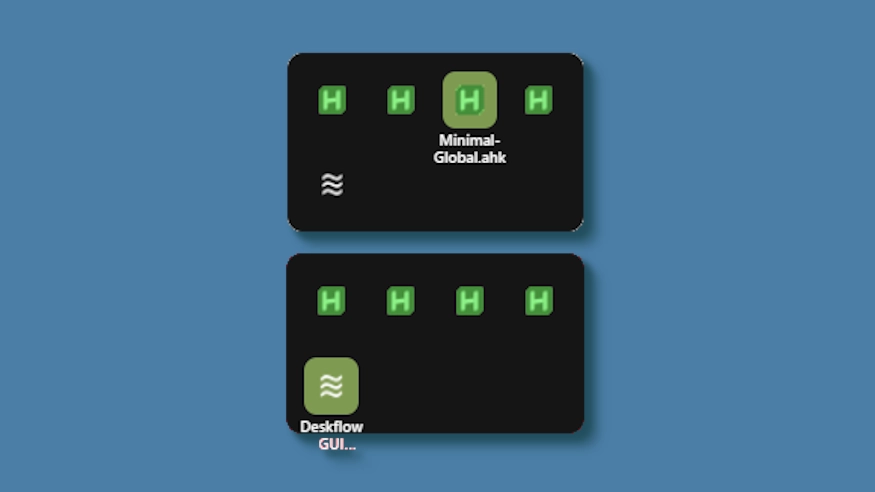
This theme changes the system tray menu to be grid-based like windows, the labels revealed on hover.
Demo: https://github.com/user-attachments/assets/ecac5a81-957d-419d-a447-3029ea0af218
Updates:
(8/6/26)
- Link add.
(3/3/26)
- Cells no longer stretch (width) to fill empty space. Cells are always the exact width and height set, so no more ugly spacing.
- The tray will now only be as big as needed — no empty space when there are fewer icons than the configured column limit.
- Labels properly appear outside the bounds of the tray.
- Various new options to be able to control the layout.
តើត្រូវប្រើយ៉ាងដូចម្តេច?
- ទាញយកនិងតំឡើង Seelen UI
- ត្រូវប្រាកដថាកម្មវិធីកំពុងដំណើរការ
- ចុចប៊ូតុងទាញយកខាងលើ
- ទទួលយកប្រអប់បញ្ចូលកម្មវិធីរុករកដើម្បីបើក Seelen UI
- កម្មវិធីនឹងគ្រប់គ្រងការតំឡើង
- ហើយនោះជាអ្វីទាំងអស់!
ការតមលៃ
- Seelen UI: 2.8.2+
- វេតិកា: Windows
បន្ថែមទៀតដោយ k-ivy


ធនធានពាក់ព័ន្ធ





ព័ត៌មានធនធាន
- ID: bc3dfebc-f534-4e0e-b08d-ef3744694138
- បុម្ពអកសរ: និក្ខេបត
- ច្បាប់: បានផ្សព្វផ្សាយ
- បានបង្កើតនៅ: អង្គារ 6 ឧសភា 2025 នៅម៉ោង 2:48:26 AM UTC
- ធ្វើបច្ចុប្បន្នភាពចុងក្រោយនៅ: សុក្រ 14 សីហា 2026 នៅម៉ោង 7:48:25 PM UTC
- ពិនិត្យនៅ: សុក្រ 14 សីហា 2026 នៅម៉ោង 7:48:25 PM UTC
- ពិនិត្យដោយ:@eythaann