

스크린샷
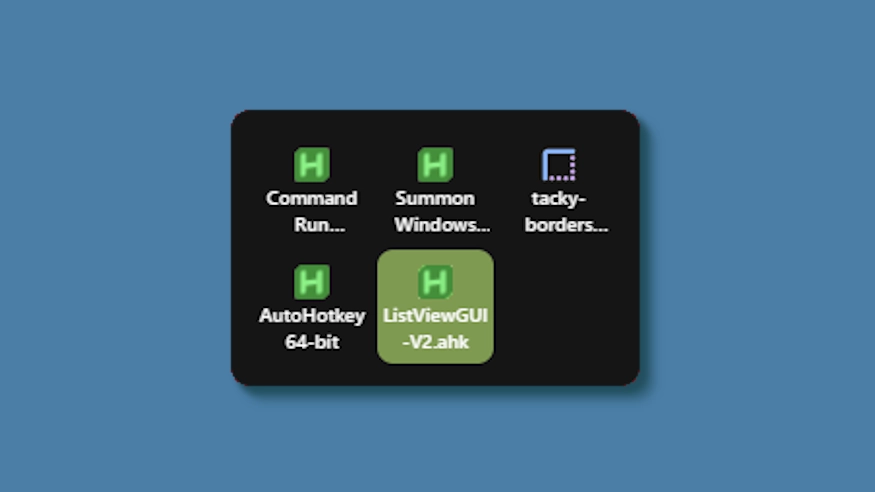
설명
This theme changes the system tray menu to be grid-based like windows, the labels always shown.
Updates:
(8/6/26)
- Link add.
(7/16/26)
- Changed method a bit - no more alignment issues (~ with defaults).
- Letter thickness and case options added. Some options removed (hardcoded defaults).
- Settings lightly restructured and wording updated.
(3/3/26)
- Cells no longer stretch (width) to fill empty space. Cells are always the exact width and height set, so no more ugly spacing.
- The tray will now only be as big as needed — no empty space when there are fewer icons than the configured column limit.
- Various new options to be able to control the layout.
어떻게 사용하나요?
- 다운로드 및 설치 Seelen UI
- 앱이 실행 중인지 확인
- 위의 다운로드 버튼을 클릭하세요.
- 브라우저 프롬프트에 동의하여 Seelen UI를 엽니다.
- 앱이 설치를 처리합니다.
- 그게 다입니다!
호환성
- Seelen UI: 2.8.2+
- 플랫폼: Windows
더보기 k-ivy


관련 리소스






리소스 정보
- ID: 5ed0eb93-85c7-46ac-ba8c-5b4e65086c55
- 유형: 테마
- 상태: 게시됨
- 만든 곳: 2025년 5월 6일 화요일 오전 3시 8분 12초 UTC
- 마지막 업데이트 날짜: 2026년 8월 16일 일요일 오후 3시 35분 18초 UTC
- 검토 장소: 2026년 8월 16일 일요일 오후 3시 35분 18초 UTC
- 검토자:@eythaann