

स्क्रीनशटहरू
वर्णन
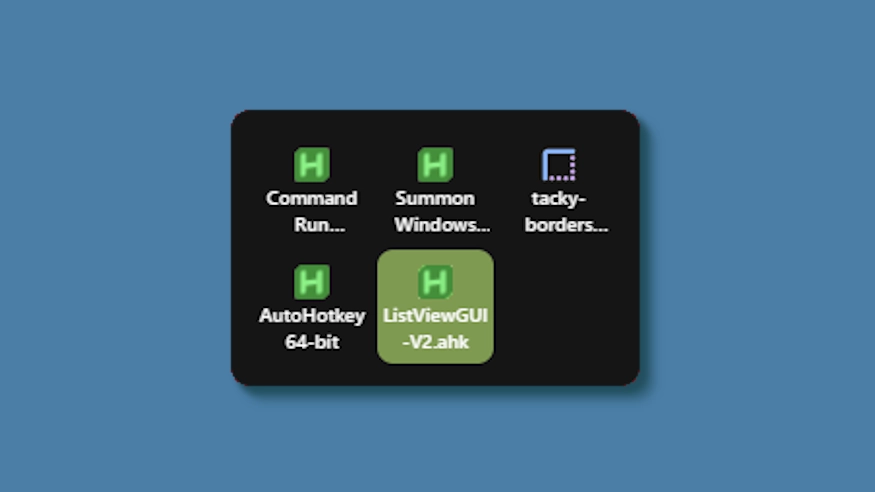
This theme changes the system tray menu to be grid-based like windows, the labels always shown.
Updates:
(8/6/26)
- Link add.
(7/16/26)
- Changed method a bit - no more alignment issues (~ with defaults).
- Letter thickness and case options added. Some options removed (hardcoded defaults).
- Settings lightly restructured and wording updated.
(3/3/26)
- Cells no longer stretch (width) to fill empty space. Cells are always the exact width and height set, so no more ugly spacing.
- The tray will now only be as big as needed — no empty space when there are fewer icons than the configured column limit.
- Various new options to be able to control the layout.
कसरी प्रयोग गर्ने?
- डाउनलोड र स्थापना गर्नुहोस् Seelen UI
- निश्चित गर्नुहोस् कि एप चलिरहेको छ
- माथिको डाउनलोड बटन क्लिक गर्नुहोस्
- Seelen UI खोल्न ब्राउजर प्रम्प्ट स्वीकार गर्नुहोस्
- अनुप्रयोगले स्थापना ह्यान्डल गर्नेछ
- र त्यो सबै हो!
अनुशासनको
- Seelen UI: 2.8.2+
- मंच: Windows
अधिक k-ivy


सम्बन्धित स्रोतहरू









संसाधन जानकारी
- ID: 5ed0eb93-85c7-46ac-ba8c-5b4e65086c55
- वर्गीकरण गर्नु: विषय
- प्रतिष्ठा: प्रकाशित गरिएको
- मा सिर्जना गरिएको: २०२५ मे ६, मङ्गलबार: ०३:०८:१२ UTC
- अन्तिम अपडेट गरिएको: २०२६ अगस्ट १६, आइतबार: १५:३५:१८ UTC
- मा समीक्षा गरियो: २०२६ अगस्ट १६, आइतबार: १५:३५:१८ UTC
- द्वारा समीक्षा गरिएको:@eythaann