

Capturas de tela
Descrição
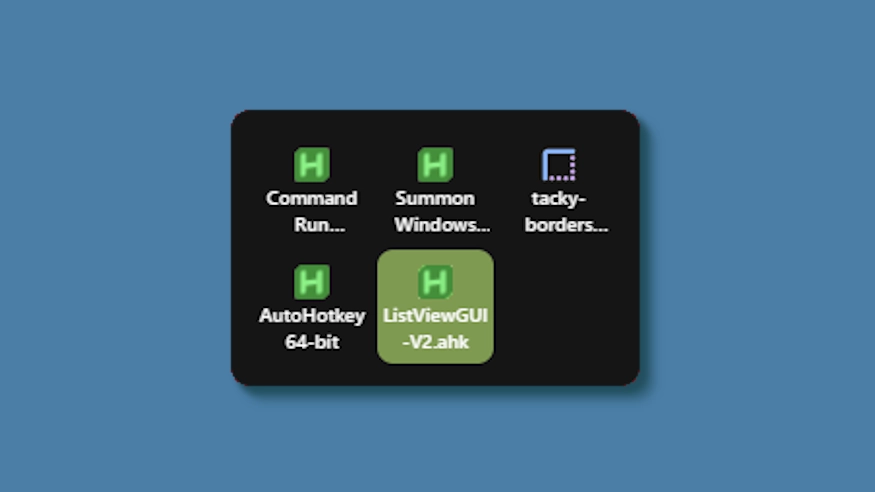
This theme changes the system tray menu to be grid-based like windows, the labels always shown.
Updates:
(8/6/26)
- Link add.
(7/16/26)
- Changed method a bit - no more alignment issues (~ with defaults).
- Letter thickness and case options added. Some options removed (hardcoded defaults).
- Settings lightly restructured and wording updated.
(3/3/26)
- Cells no longer stretch (width) to fill empty space. Cells are always the exact width and height set, so no more ugly spacing.
- The tray will now only be as big as needed — no empty space when there are fewer icons than the configured column limit.
- Various new options to be able to control the layout.
Como usar?
- Faça o download e instale Seelen UI
- Verifique se o aplicativo está em execução
- Clique no botão de download acima
- Aceite a solicitação do navegador para abrir a interface do usuário da Seelen
- O aplicativo cuidará da instalação
- E isso é tudo!
Compatibilidade
- Seelen UI: 2.8.2+
- Plataforma: Windows
Mais por k-ivy


Recursos relacionados






Informações sobre recursos
- ID: 5ed0eb93-85c7-46ac-ba8c-5b4e65086c55
- Tipo: Tema
- Status: Publicado
- Criado em: terça-feira, 6 de maio de 2025 às 03:08:12 UTC
- Última atualização em: domingo, 16 de agosto de 2026 às 15:35:18 UTC
- Avaliado em: domingo, 16 de agosto de 2026 às 15:35:18 UTC
- Avaliado por:@eythaann