

స్క్రీన్షాట్లు
వివరణ
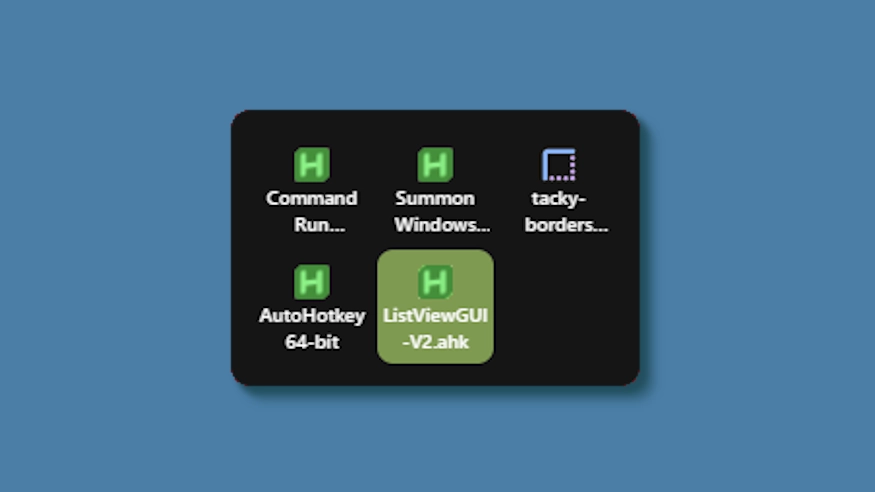
This theme changes the system tray menu to be grid-based like windows, the labels always shown.
Updates:
(8/6/26)
- Link add.
(7/16/26)
- Changed method a bit - no more alignment issues (~ with defaults).
- Letter thickness and case options added. Some options removed (hardcoded defaults).
- Settings lightly restructured and wording updated.
(3/3/26)
- Cells no longer stretch (width) to fill empty space. Cells are always the exact width and height set, so no more ugly spacing.
- The tray will now only be as big as needed — no empty space when there are fewer icons than the configured column limit.
- Various new options to be able to control the layout.
ఎలా ఉపయోగించాలి?
- డౌన్లోడ్ చేసి, ఇన్స్టాల్ చేయండి Seelen UI
- యాప్ రన్ అవుతుందని నిర్ధారించుకోండి
- పైన ఉన్న డౌన్లోడ్ బటన్ను క్లిక్ చేయండి
- సీలెన్ UIని తెరవడానికి బ్రౌజర్ ప్రాంప్ట్ను అంగీకరించండి
- యాప్ ఇన్స్టాలేషన్ను నిర్వహిస్తుంది
- అంతే!
అనుకూలత
- Seelen UI: 2.8.2+
- వేదిక: Windows
resources.view.more_by


సంబంధిత వనరులు






వనరుల సమాచారం
- ID: 5ed0eb93-85c7-46ac-ba8c-5b4e65086c55
- రకం: థీమ్
- స్థితి: ప్రచురించబడింది
- వద్ద సృష్టించబడింది: 6, మే 2025, మంగళవారం 3:08:12 AM UTCకి
- చివరిగా నవీకరించబడింది: 16, ఆగస్టు 2026, ఆదివారం 3:35:18 PM UTCకి
- వద్ద సమీక్షించబడింది: 16, ఆగస్టు 2026, ఆదివారం 3:35:18 PM UTCకి
- సమీక్షించారు:@eythaann