

Ekran Görüntüleri
Açıklama
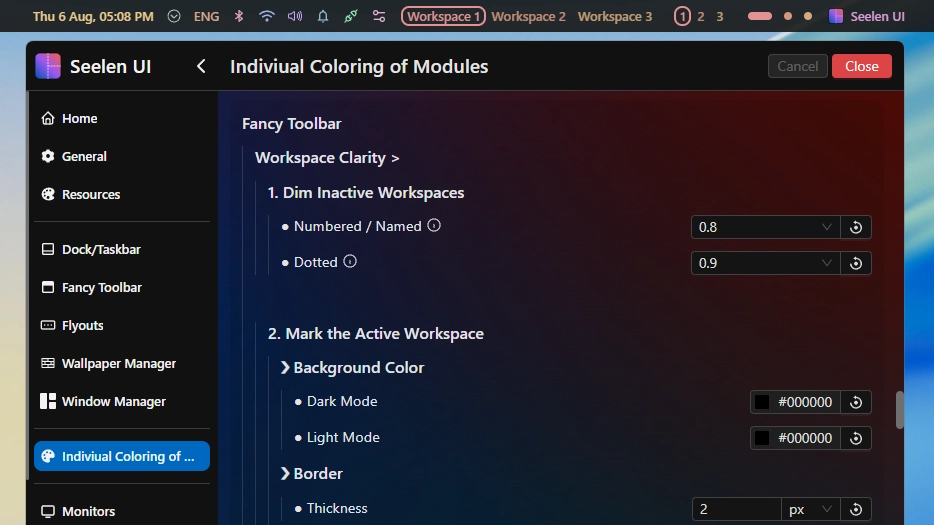
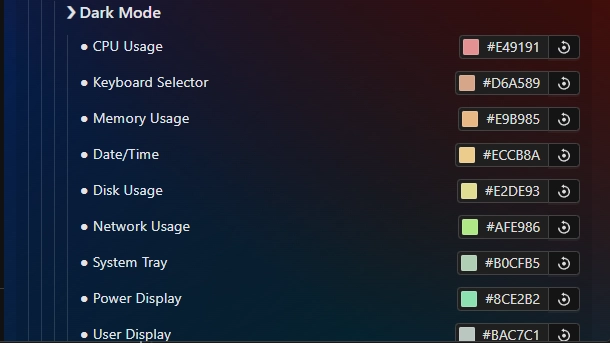
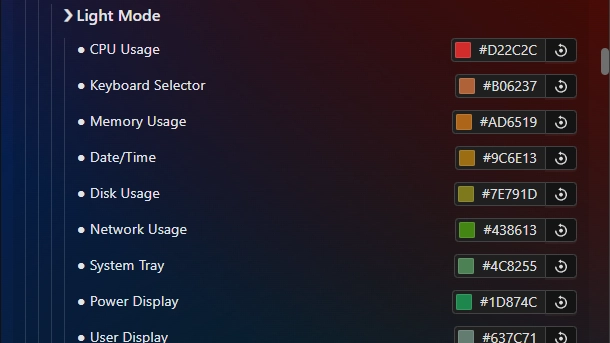
This theme allows you to individually color each module of the toolbar. This includes coloring each individual workspace differently.
In addition, this has a special placeholder system in place to allow you to color any custom module (from plugins) directly from within this theme's settings.
Wiki: https://k-ivy.github.io/Seelen-UI-Resources/Web/wiki.html#Indiviual-Coloring-of-Toolbar-Modules
Updates:
(8/6/26) Individual Coloring of Toolbar Modules:
- BEFORE UPDATING: If you have a custom palette, BACK IT UP before updating or you will lose it (variable names changed b/c of the below):
- MAJOR: There are now two palettes, they swap as you go into light or dark mode! Now the visibility in both modes is even and you can create nicer variants.
- Full settings restructure (focused on ease of use).
- Workspace indicator improvements:
- Inactive workspaces are dimmed (0.8 visibility for numbered and named / 0.9 for dotted by default)
- Dynamic border returns! Note: Uses box-shadow for compatibility with other resources. This is disabled by default, enable in settings!
- You can now also set a background color! Note: Uses box-shadow for compatibility with other resources. This is unused by default, adjust in settings!
- Increased workspace and placeholder slots slots to 30.
- Changed the placeholder palette to match the workspace palette.
(3/4/26)
- Updated for 2.5.X+ and added the new modules.
- Made final adjustments to the default palette.
- Removed colorful border around active workspace (numbered & named) due to it going beyond the theme's purpose and interfering with other resources. Instead to make the active workspace clear, text decoration is used, the default an underline - shown in the first screenshot.
- Placeholder slots increased to 25.
Nasıl kullanılır?
- İndirin ve yükleyin Seelen UI
- Uygulamanın çalıştığından emin olun
- Yukarıdaki indirme düğmesine tıklayın
- Seelen kullanıcı arayüzünü açmak için tarayıcı istemini kabul edin
- Uygulama kurulumu gerçekleştirecektir
- Ve hepsi bu kadar!
Uyumluluk
- Seelen UI: 2.8.2+
- Platform: Windows
Daha fazlası k-ivy


İlgili Kaynaklar





Kaynak Bilgileri
- ID: 918ba595-e529-4f0c-8227-e72826d54ddc
- Tip: Tema
- Durum: Yayınlandı
- Şu Adreste Oluşturuldu: 24 Mayıs 2025 Cumartesi 00:36:26 UTC
- Son Güncelleme Tarihi: 16 Ağustos 2026 Pazar 15:35:07 UTC
- Şu Adreste İncelendi: 16 Ağustos 2026 Pazar 15:35:07 UTC
- Tarafından değerlendirildi:@eythaann