

屏幕截圖
描述
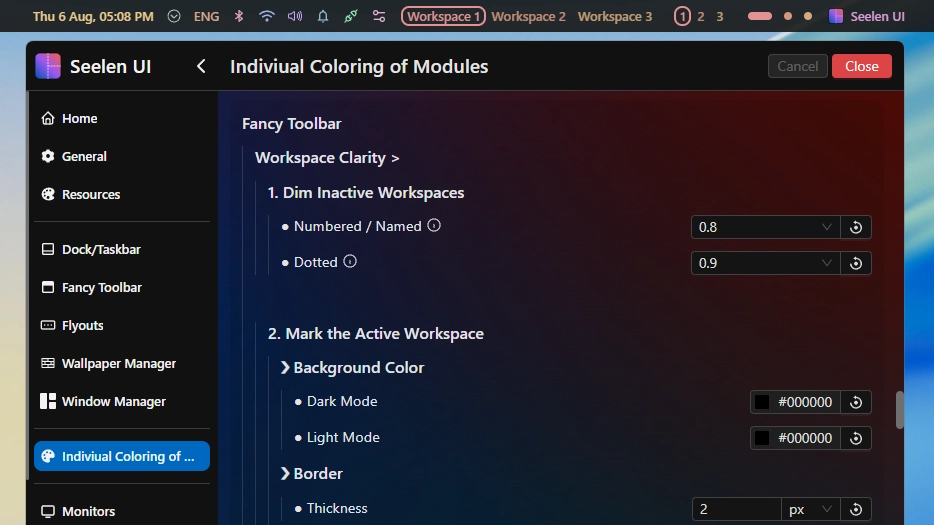
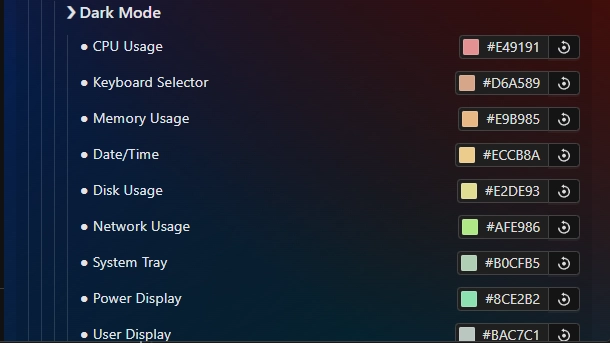
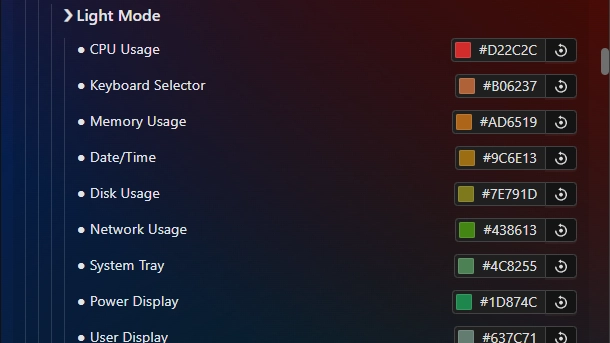
This theme allows you to individually color each module of the toolbar. This includes coloring each individual workspace differently.
In addition, this has a special placeholder system in place to allow you to color any custom module (from plugins) directly from within this theme's settings.
Wiki: https://k-ivy.github.io/Seelen-UI-Resources/Web/wiki.html#Indiviual-Coloring-of-Toolbar-Modules
Updates:
(8/6/26) Individual Coloring of Toolbar Modules:
- BEFORE UPDATING: If you have a custom palette, BACK IT UP before updating or you will lose it (variable names changed b/c of the below):
- MAJOR: There are now two palettes, they swap as you go into light or dark mode! Now the visibility in both modes is even and you can create nicer variants.
- Full settings restructure (focused on ease of use).
- Workspace indicator improvements:
- Inactive workspaces are dimmed (0.8 visibility for numbered and named / 0.9 for dotted by default)
- Dynamic border returns! Note: Uses box-shadow for compatibility with other resources. This is disabled by default, enable in settings!
- You can now also set a background color! Note: Uses box-shadow for compatibility with other resources. This is unused by default, adjust in settings!
- Increased workspace and placeholder slots slots to 30.
- Changed the placeholder palette to match the workspace palette.
(3/4/26)
- Updated for 2.5.X+ and added the new modules.
- Made final adjustments to the default palette.
- Removed colorful border around active workspace (numbered & named) due to it going beyond the theme's purpose and interfering with other resources. Instead to make the active workspace clear, text decoration is used, the default an underline - shown in the first screenshot.
- Placeholder slots increased to 25.
如何使用?
- 下載並安裝 Seelen UI
- 確保應用程序正在運行
- 點擊上面的下載按鈕
- 接受瀏覽器提示打開 Seelen UI
- 該應用程序將處理安裝
- 僅此而已!
相容性
- Seelen UI: 2.8.2+
- 平台: Windows
k-ivy的更多信息


相關資源







資源信息
- ID: 918ba595-e529-4f0c-8227-e72826d54ddc
- 類型: 主題
- 地位: 出版
- 創建在: 2025年5月24日 星期六 凌晨12:36:26 [UTC]
- 最後更新: 2026年8月16日 星期日 下午3:35:07 [UTC]
- 在: 2026年8月16日 星期日 下午3:35:07 [UTC]
- 審查:@eythaann