Best Rainmeter Alternative: Seelen UI vs Rainmeter (2026)
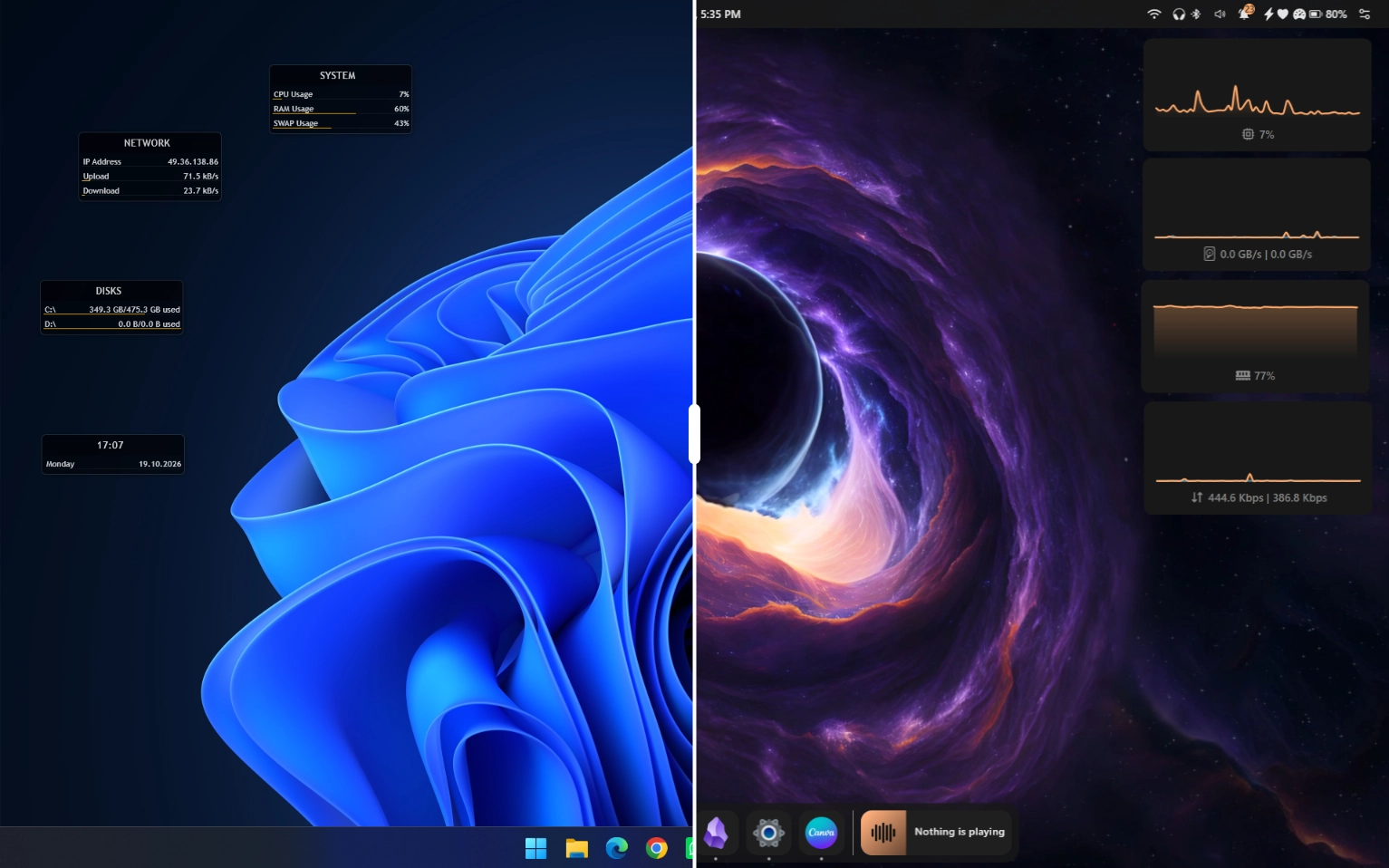
Short answer: Rainmeter is a desktop widget engine: it draws skins on top of your wallpaper and leaves the rest of Windows alone. Seelen UI is a full desktop environment: it replaces the taskbar, adds a dock, an app launcher, tiling window management and virtual desktops, and it also supports desktop widgets. Both put widgets on your desktop, but only Seelen UI also changes how the rest of Windows looks and works, all in one app. That makes Seelen UI the better choice for most people looking for a Rainmeter alternative.
Key takeaways
- Different scope. Rainmeter's own documentation says it "is not a window manager" and "cannot change the appearance of your taskbar, Start button, desktop icons, file explorer, or other built-in Windows components." Seelen UI is built to replace exactly those surfaces.
- Both are free and open source. Rainmeter is GPL-2.0; Seelen UI is AGPL-3.0.
- No config files in Seelen UI. Customizing a Rainmeter skin usually means editing its
.inifile. Seelen UI is configured entirely from its settings app, so it's built for everyone, not only people comfortable editing code. - A built-in marketplace. Rainmeter skins are spread across DeviantArt, Reddit and fan sites. Seelen UI installs themes, widgets, icon packs, wallpapers, plugins and sound packs in one click from seelen.io/resources.
- Doesn't touch Windows system files. Seelen UI runs its own shell components and uninstalls like any other app.
- You don't have to pick one. Nothing stops you from running Rainmeter skins on top of a Seelen UI desktop.
At a glance
| Seelen UI | Rainmeter | |
|---|---|---|
| What it is | Full desktop environment for Windows | Desktop widget (skin) engine |
| Replaces the taskbar | Yes (custom toolbar) | No |
| Dock | Yes | No (community skins can imitate one) |
| Tiling window manager | Yes (BSP, columns, stacks) | No |
| Virtual desktops | Yes, with wallpaper per workspace | No |
| Desktop widgets | Yes | Yes (its core feature) |
| App launcher | Yes, fuzzy search | No (launcher skins exist) |
| How you configure it | Settings app, no config files | Manage window to load skins; customizing a skin means editing its INI file |
| Marketplace | Built in (seelen.io/resources), one-click install | None built in; skins downloaded from third-party sites as .rmskin packages |
| Theming language (for creators) | CSS + JSON | Rainmeter INI skin language |
| Custom widget development | Svelte + TypeScript SDK | INI measures and meters, Lua scripting |
| License | AGPL-3.0 | GPL-2.0 |
| Price | Free | Free |
| Supported OS | Windows 10 and 11 | Windows |
| Latest release (Sept 2026) | v2.8.6 (Sept 18, 2026) | 4.5.26 (May 20, 2026) |
| GitHub stars (Sept 2026) | ~17.9k | ~6k |
What is Rainmeter?
Rainmeter is one of the oldest and best-known Windows customization tools. It runs skins: small programs on your desktop that show information or act as shortcuts. The official getting-started guide describes skins as ranging from "very simple, single-purpose tools, like Windows desktop gadgets" to things "more complex, like miniature applications themselves."
Each skin is made of two building blocks:
- Measures collect data (CPU usage, time, weather, audio levels, RSS feeds).
- Meters display that data as text, images, bars, graphs or buttons.
The guide is also clear about what Rainmeter is not. It does not change your Windows visual style, it is not a window manager, and "it does not enable 'workspaces' or manage multi-monitor setups."
That focus is Rainmeter's strength. It is small and mature, and after many years of community work there are skins for almost anything you can think of.
What is Seelen UI?
Seelen UI is a free, open-source desktop environment for Windows 10 and 11. It doesn't try to decorate Windows. It replaces the parts of the shell you use every day:
- Toolbar: a fully themeable, widget-powered bar that replaces the Windows taskbar
- Dock: a macOS-style app dock with launch, focus and badge support
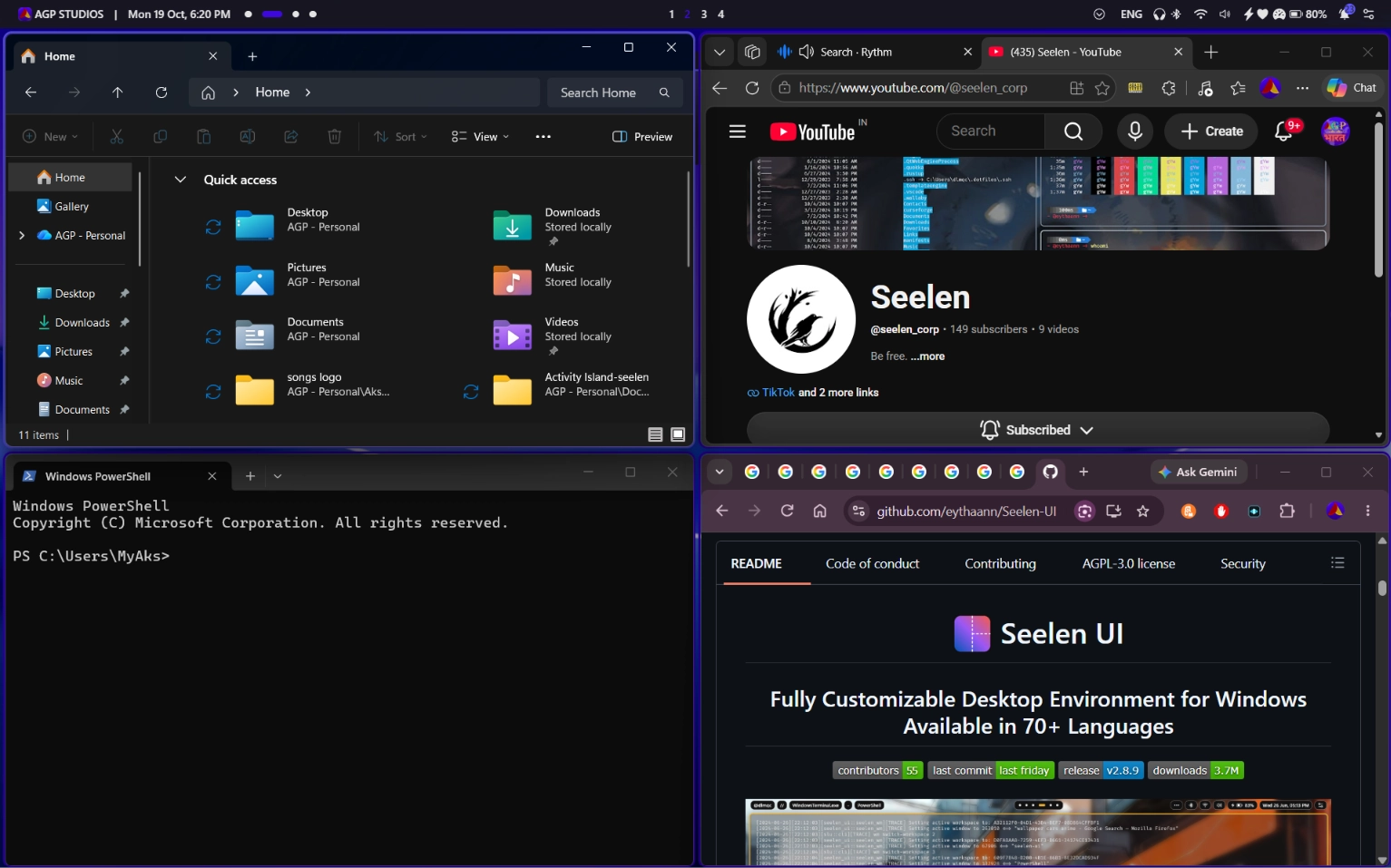
- Tiling window manager: automatic BSP, column and stack layouts with gaps, floating mode and per-app rules
- Virtual desktops: Seelen UI's own implementation, with named workspaces, a workspace overview and a different wallpaper per workspace
- App launcher: a keyboard-driven, Rofi-inspired launcher with fuzzy search for apps, files and commands
- Desktop widgets: clocks, system monitors, media controls and custom widgets on the wallpaper layer
- Custom flyouts and Alt+Tab: themed volume, brightness and system panels, plus a skinnable task switcher
- Dynamic accent color: the accent color is derived from your current wallpaper automatically
Everything is configured from one settings app, and the interface is translated into 70+ languages. Seelen UI is written in Rust and TypeScript on top of Tauri, and it does not modify Windows system files.

Feature-by-feature comparison
Desktop widgets
This is the only category where the two tools overlap directly.
Rainmeter is a widget specialist. Its measure/meter model can read almost any system value, and its community has published skins for years: audio visualizers, weather panels, calendar suites, hardware monitors.
Seelen UI widgets sit on the same desktop layer and are theme-aware: they pick up your active theme and your dynamic accent color, so a widget matches the toolbar and dock with no manual color matching. Each widget can also carry its own style. Custom widgets are built with the Seelen UI widget SDK in Svelte and TypeScript, with access to system state.
Verdict: Tie. Rainmeter has a longer-running skin catalog; Seelen UI widgets automatically stay visually consistent with the rest of your desktop.
Taskbar, dock and Start menu
Rainmeter can't touch these. You can hide the Windows taskbar and build a dock-like skin, but it's a skin sitting on the desktop, not a real replacement that tracks your open windows.
Seelen UI replaces the taskbar with its toolbar, adds a dock that knows about running apps, and includes a Start menu replacement and an app launcher. These are shell components, not decorations.
Verdict: Seelen UI. Rainmeter was never designed to do this.
Window management and workspaces
Rainmeter's documentation states it "does not keep track of your open windows" and "cannot maximize or minimize other application windows."
Seelen UI includes a full tiling window manager. Windows arrange themselves automatically, and you can resize, swap and move them from the keyboard. You also get per-app rules (float this app, send that app to workspace 3) and virtual desktops with animated transitions.
Verdict: Seelen UI. If you want tiling alongside Rainmeter, you have to add a separate tool such as GlazeWM or Komorebi.
Theming and learning curve
Rainmeter skins are written in Rainmeter's own configuration language, with optional Lua scripting. The docs call it "suitable for novice programmers," comparable in difficulty to HTML or JavaScript. That knowledge doesn't transfer much outside Rainmeter, though.
Even as a user, changing a Rainmeter skin (its size, colors, the city in a weather skin) often means opening its .ini file in a text editor.
Seelen UI is configured entirely from its settings app: there are no config files to edit, so it's made for everyday users, not only people with technical knowledge. Theming means picking a community theme and adjusting it in settings. For creators, themes are CSS and JSON, so anyone who has styled a web page already knows the basics.
Verdict: Seelen UI. No files to edit as a user, and reusable web skills (CSS, TypeScript) if you want to create.
Wallpapers
Rainmeter has no wallpaper engine of its own. Seelen UI has a built-in wallpaper manager that supports image, video and layered (CSS-based) wallpapers, per-workspace wallpapers, and an accent color that updates automatically. If wallpapers are your main interest, see our comparisons with Wallpaper Engine and Lively Wallpaper.
Marketplace and community
Rainmeter's long history gives it a large catalog of skins, but it has no built-in store: you find skins on DeviantArt, Reddit and fan sites, download a .rmskin package and install it.
Seelen UI has a built-in marketplace at seelen.io/resources, where you browse and install themes, widgets, icon packs, wallpapers, plugins and sound packs in one click.
Verdict: Seelen UI. Rainmeter's catalog is older, but Seelen UI gives you one place to find and install everything, without hunting across sites.
Who Rainmeter is for
- People who only want widgets and are happy with the stock Windows taskbar and window behavior.
- People who want a specific classic skin that only exists for Rainmeter.
- People who already know Rainmeter's skin language well.
Why Seelen UI is the better pick
- You want to change how Windows works, not only how the desktop looks: taskbar, dock, launcher, tiling, workspaces.
- You want one app and one settings screen instead of stitching together Rainmeter, a dock app, a tiling manager and a wallpaper app.
- You want to set everything up from a settings app, without editing INI files.
- You want a built-in marketplace for themes, widgets, icons, wallpapers and sounds.
- You prefer CSS and TypeScript over a proprietary skin language when you create.
- You want everything, including widgets, bars, dock and wallpaper, to share one theme and one accent color automatically.
Can you use Seelen UI and Rainmeter together?
Yes. Rainmeter draws skins on the desktop, and Seelen UI replaces shell components, so they target different layers. A common setup is Seelen UI for the toolbar, dock, launcher and tiling, with a favorite Rainmeter visualizer or weather skin on the desktop. If both show the same kind of widget (two clocks, say), turn one of them off.
FAQ
Is Seelen UI a good Rainmeter alternative?
Yes. Seelen UI covers Rainmeter's main use case (desktop widgets) and adds a taskbar replacement, dock, tiling and virtual desktops. Rainmeter skins don't convert automatically, but you can keep running your favorites alongside Seelen UI.
Is Seelen UI lightweight?
Yes. Seelen UI is designed to stay lightweight, and every module (dock, tiling, widgets, wallpapers) can be disabled, so you only run what you use.
Do I need to code to use either one?
Not to install things. With Rainmeter, adjusting a skin often means editing its INI file. With Seelen UI, everything is configured in the settings app and resources install from the built-in marketplace, so code only matters if you want to create your own themes or widgets.
Does Seelen UI work on Windows 10?
Yes. Seelen UI supports Windows 10 and Windows 11. On Windows 10, the required WebView runtime is bundled with the setup.exe installer.
Bottom line
Rainmeter is a widget engine. Seelen UI is a desktop environment that does widgets too, plus the taskbar, dock, launcher and window management, all working as one themed system. If you're looking for a Rainmeter alternative, Seelen UI covers what Rainmeter does on the desktop and much more.
Download Seelen UI for free from the Microsoft Store, winget (winget install --id Seelen.SeelenUI) or GitHub, then browse themes and widgets at seelen.io/resources.
Sources: Rainmeter getting-started manual, Rainmeter on GitHub, Seelen UI on GitHub. Version numbers and star counts checked September 2026.