Screenshots
Description
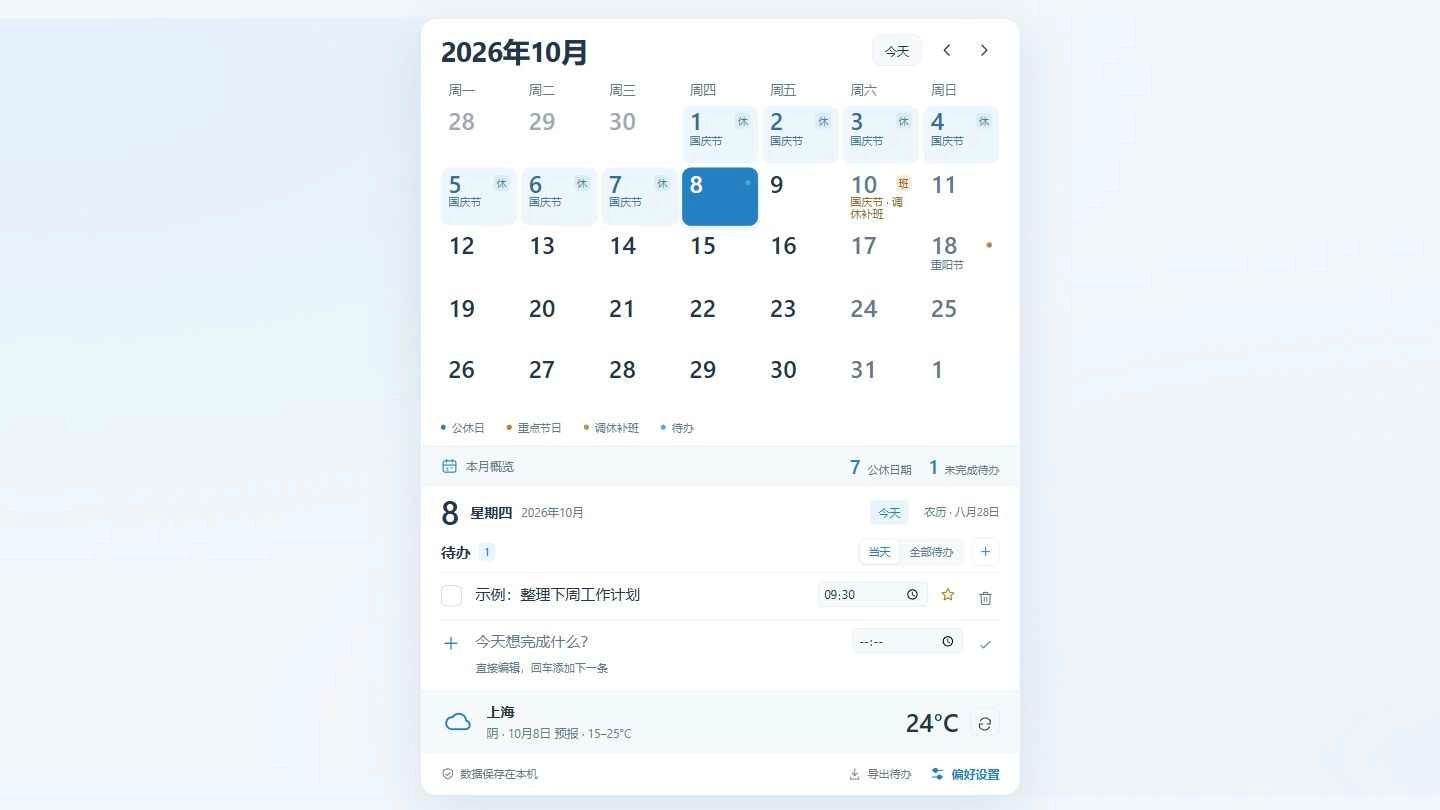
A compact calendar with localized holidays, inline to-dos and city weather. Choose your country, language and city in Preferences. Press Enter to add the next to-do. Tasks stay on your device.
How to use?
- Download and install Seelen UI
- Make sure the app is running
- Click the download button above
- Accept the browser prompt to open Seelen UI
- The app will handle the installation
- And that's all!
Compatibility
- Seelen UI: 2.8.8+
- Platform: Windows
Related Resources






Resource Information
- ID: bdd38b27-0adb-4368-a287-c4858a304997
- Type: Widget
- Status: Published
- Created At: Thursday, October 8, 2026 at 8:08:52 AM UTC
- Last Updated At: Thursday, October 8, 2026 at 8:58:25 AM UTC
- Reviewed At: Thursday, November 19, 2026 at 12:07:15 PM UTC
- Reviewed By:@eythaann